
In 2026 comes down to three decisions: the platform your organisation already runs (Microsoft Teams, Cisco Webex, or Zoom), the size and purpose of the room, and whether you want a dedicated room system or a flexible BYOD setup. Get those three right, and the hardware shortlist almost picks itself.
In our 10+ years deploying video conferencing solutions in India – across manufacturing plants, hospitals, education institutes, and corporate offices in Gujarat and across India, we’ve seen one pattern repeat itself: companies buy video conferencing hardware first and think about the platform, the room, and the network second. That order is backwards — and it’s usually why a ₹6 lakh boardroom system ends up as an expensive screen that nobody trusts before a board meeting.
This guide walks through the decision the way we actually do it on a customer site visit.
PKEL Video Conferencing Solution in India
The platform decision is non-negotiable. Your video conferencing room hardware has to be certified for the calling platform your organisation uses, or you’ll fight integration issues every day.
Field note: We see clients try to “save money” by running Zoom on a Teams-certified room, or vice versa. It works in demos. It breaks at scale — calendar invites don’t auto-launch, one-touch-join fails, and meetings start 5 minutes late every single time.
Room geometry determines hardware. A camera and microphone that work beautifully in a 4-person huddle room will fail in a 16-seat boardroom, and vice versa.
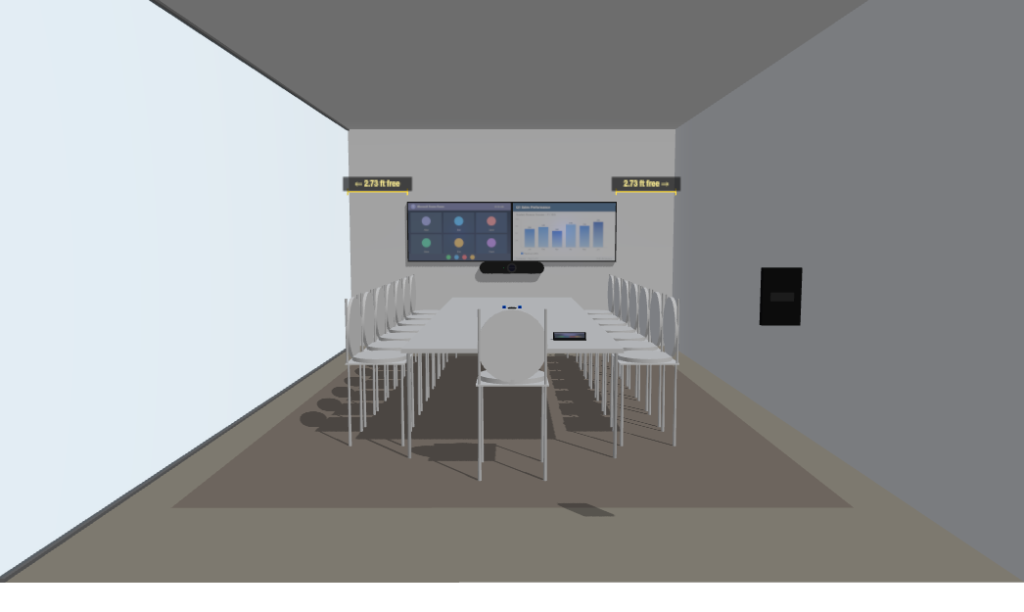
What our design process actually produces. When we quote a video conferencing room, you don’t get a vague Excel BOM with line items and a price. We use our own internal room configurator to produce a complete one-page design — room dimensions, table layout, exact camera and microphone placement, display height, cable runs, PoE port count, and a 3D rendering — so the person approving your budget can see the room before it’s built. It’s how we’ve designed rooms at leading corporates in Vadodara, Gujarat.
These are the issues we get called in to fix at clients across Gujarat. If you’re planning a new deployment, design them out from day one.
We were called recently to a client whose Microsoft Teams Rooms had become unreliable across the office. The root cause: multiple Neat devices in different rooms had been configured to log in with the same Exchange room mailbox. When two meetings were booked at the same time in different rooms, both devices tried to join — calendar invites collided, and rooms appeared “busy” when they were free.
Each MTR device must have its own dedicated Exchange resource mailbox. This sounds basic. We’ve seen it wrong at three sites this year.
A meeting shows up an hour off, and everyone blames the device. Almost always, it’s the time zone setting on the Exchange room mailbox that doesn’t match the device’s regional setting. Fixable in PowerShell in two minutes — but only if you know to look there.
Meeting Owl 3 and Rally Bar pick up audio brilliantly — including the audio of your air conditioner, your glass walls, and your laminated table. Rooms with hard, parallel surfaces produce echo and reverb that even the best AI noise suppression can’t fully fix. Plan for at least basic acoustic treatment (carpet, fabric panels, or ceiling tiles) for any room above 12 feet × 12 feet.
Video conferencing traffic is real-time and unforgiving. If your network is treating a Webex call the same as a software update download, you’ll get pixelation, frozen video, and dropped audio at the worst moments. Quality of Service (QoS) tagging on the network switches and proper VLAN segmentation should be configured before the VC hardware lands on site.
Retrofitting CAT 6A cabling, HDMI runs, and power for a boardroom AV system after the false ceiling is closed costs three to four times what it would cost during the original fit-out. Cable paths and conduit should be specified at the civil drawing stage, not after the carpenters have left.
A common rule of thumb in our deployments: video conferencing solution in India deployment quality is 70% network, 30% device.
A minimum viable network for video conferencing in 2026 needs:
For larger deployments (more than 10 rooms, or multi-location organisations), a site survey using calibrated tools like Fluke is worth the investment. We’ve installed 4,000+ network nodes at a single site on CommScope CAT 6A — the network design and the VC design have to be done together.
When you ask three vendors for video conferencing quotes, you’ll get three numbers that look comparable. They almost never are. A complete budget for a boardroom should include:
A common gap: clients budget for hardware and licences but forget the AMC and the cabling. Then by Year 2, when a microphone fails, there’s no support contract and the OEM has stopped responding to direct emails.
| Microsoft Teams Rooms | Cisco Webex | Zoom Rooms | BYOD (Owl / Meetup 2) | |
|---|---|---|---|---|
| Best for | Microsoft 365 organisations | Cisco / Webex / BFSI / Govt | Education, mid-market | Huddle rooms, flexible spaces |
| Certified hardware | Neat, Logitech, Poly, Yealink | Cisco Room Kits, Webex Desk | Logitech, Poly, Yealink, DTEN | Meeting Owl, Rally Bar, Poly Studio |
| Calendaring | Exchange / Microsoft 365 | Webex Control Hub | Zoom + Google / Outlook | Whatever the laptop runs |
| One-touch join | Excellent (native) | Excellent (native) | Excellent (native) | Manual launch |
| Typical room cost (INR) | ₹2L – ₹10L | ₹4L – ₹15L | ₹1.8L – ₹7L | ₹80k – ₹2.5L |
| Annual licence | ₹4k – ₹8k per room | ₹5k – ₹12k per room | ₹3k – ₹6k per room | None (uses laptop licence) |
| Manageability at scale | Strong (Teams Admin Centre, Pro Mgmt) | Strong (Control Hub) | Good (Zoom Admin) | Limited |
If you’re starting from scratch, work through these five questions in order:
Get all five right, and the vendor shortlist becomes obvious.
Which is the best Video conferencing solution in India ?
There is no single best system. For organisations on Microsoft 365, Microsoft Teams Rooms on Neat or Logitech hardware is usually the practical choice. For Cisco-aligned enterprises, Webex Room Kits remain the most mature option. For huddle rooms and flexible spaces, BYOD devices like Meeting Owl 3 or Logitech Rally Bar offer the lowest total cost.
What is the difference between Microsoft Teams Rooms (MTR) and BYOD?
MTR is a dedicated room system with a Teams-certified codec, room mailbox, and one-touch join from a calendar invite. BYOD systems connect to a user’s laptop and use whatever platform the laptop has open. MTR is more reliable for daily-use rooms; BYOD is more flexible for occasional-use rooms.
Do I need a separate licence for a Microsoft Teams Room?
Yes. Each MTR device needs a Teams Rooms Pro or Teams Rooms Basic licence, in addition to the Exchange resource mailbox. The Pro licence adds advanced device management and analytics.
How much bandwidth does a video conference call use?
A 1080p HD call uses around 3–4 Mbps per direction. A 4K call can use 8–10 Mbps. For a building with 5 simultaneous HD calls, plan for at least 30–40 Mbps of dedicated upload bandwidth with QoS.
Can I use a BYOD device like Meeting Owl 3 for a boardroom of 16 people?
Generally not as a single unit. A single Meeting Owl 3 covers rooms up to about 18 ft. For larger boardrooms, either pair two units or move to a dedicated room system with ceiling mic arrays.
Should we go with a Cisco Premier Partner for Webex deployments?
Cisco Premier and Gold Partner status indicates the integrator has trained and certified engineers, has cleared minimum project volumes, and gets direct OEM support escalation. For mission-critical deployments, this matters when something needs to be fixed at 9 PM on a quarter-end.
How long does it take to deploy a typical conference room?
For a single conference room with hardware ready and network in place, deployment is usually 1–2 days. For a fit-out boardroom with cabling, displays, and acoustic work, plan 7–10 working days. For a multi-room rollout across an office, 4–8 weeks depending on size.
What about hybrid meetings — do I need different equipment?
The same room hardware works for hybrid meetings. What changes is the room layout: hybrid meetings need camera framing that includes everyone in the room, and microphones that pick up everyone equally. Front-facing cameras with table mics work poorly here; ceiling mics or 360° cameras like Meeting Owl 3 work much better.
As a provider of video conferencing solution in India for over 40 years, we’re a Cisco Premier Partner and one of the highest-volume CommScope and Systimax structured cabling installers in Gujarat. We design and deploy video conferencing rooms across Microsoft Teams Rooms, Cisco Webex, Zoom Rooms, and BYOD platforms — including the cabling, the network QoS, the acoustic work, and the ongoing AMC.
Our demo room in Vadodara is a working multi-vendor setup so you can compare devices in the same room before you commit. Currently installed:
You can walk through one-touch join, content sharing, hybrid whiteboarding, and audio coverage on each device, in the same room conditions, before deciding what fits your space. You’re welcome to come and try it.
A design deliverable, not a quote. Most integrators send you an Excel BOM. We send you a one-page room design — 3D rendering, exact dimensions, table layout, camera and mic placement, display height, cable runs, switch port count — produced by our internal VC room configurator. It’s the same level of detail we used for the Alembic ARC, Linde, and Tata-Airbus deployments. You can share it with finance and facilities for approval without needing us in the room to explain what’s in the box.
If you’re planning a new conference room or evaluating video conferencing solutions in India for a multi-office rollout, we’d be glad to do a no-cost site assessment.
Contact us here or call +91-9924789992.
Related reading:
– Why Companies Are Choosing Meeting Owl 3 for Video Conferencing
– PKEL Video Conferencing Solutions
– Boardroom & AV Integration
Author: Rahil Patwa, Executive Director, Patwa Kinarivala Electronics Ltd. Rahil leads PKEL’s IT infrastructure and collaboration practice and has overseen video conferencing and structured cabling deployments at flagship clients
© Copyright 2019 Patwa Kinarivala. All Right Reserved. Privacy-Policy
Designed & Developed by e-intelligence